

Scheduling is done via WellnessLiving.
Getting Started in WellnessLiving
For detailed instructions, read our Getting Started Page.
1 • Create an account
Create an account for yourself on our secure scheduling system. If you are not the student, you may fill in required fields as “N/A.”
You will receive 2 emails during this process: one is automated from WellnessLiving and the second is sent from our Support Staff that is packed with information about our program and processes to help you be successful!
Add children or dependents who are swimmers: go to the My Profile tab > Edit Profile > Add relationship. Each swimmer requires their own profile in your account.
There is a checkbox to copy email, phone number, and address from your profile to the child’s. Waivers need to be signed on all profiles.
2 • Purchase a package
Lessons are booked using the credits in a package. Packages are not shared between family members.
Log into the swimmer’s profile before making a purchase. This will ensure the package is applied to them. Contact Support if you purchase on the wrong profile to request a transfer.
To purchase, go to the Store tab and select a New Student package.
3 • Contact for scheduling assistance
One round of scheduling help is included with your New Student Package. Using this service will help ensure your swimmer gets the best possible lesson cadence to be successful in our program!
Please email support@swim.guru or fill out this form for scheduling assistance once you have created your account and swimmer profiles and purchased a lesson package.
Download the SwimGuru App:
After making your first purchase and creating your account, you’ll be able to book lessons through our app. Our students tend to prefer booking via the app, but booking is always available via the Online Scheduler as well.
Booking Tips
Do not wait to book! All appointments are first-come first served, and must be individually booked, so don’t wait to schedule all the lessons in your purchased package. We do not offer automatically recurring lesson times. To ensure success with our program and get your preferred lesson times, you should book all lessons in the New Student Starter Package as soon as you are able.
Schedule Releases
Planning ahead is the most successful way to start in our swimming programs:
We release a new schedule 3 times a year.
Our sessions are January-April, May-August, and September-December.
Be on the lookout for emails announcing the next schedule release 6-8 weeks prior to the start of the session.
Sign up in WellnessLiving to start receiving these announcements!
If you have a non-water-safe student or need assistance booking, you can fill out our pre-booking form (included in the announcement emails) for priority booking.
Be sure to read our guide for kids or for adults to prepare you before your first lesson.
Search Tips
Identify whether our availability matches yours (see video below):
Appointment length: children should begin with 15-minute appointments and adults should begin with a 30-minute appointment.
Select your preferred location before walking through the scheduler. The system allows searching one location at a time; however, you may have multiple windows open to view other pools at the same time.
Look for a consistent schedule (2x a week for kids) with one or two coaches for best results.
Please email support@swim.guru, or call (206) 200-9449, option 1, to schedule your first lessons. You you may also fill out this form to get started.
If you are enrolling multiple students at once, please contact us for support first, and we will guide you through the process.
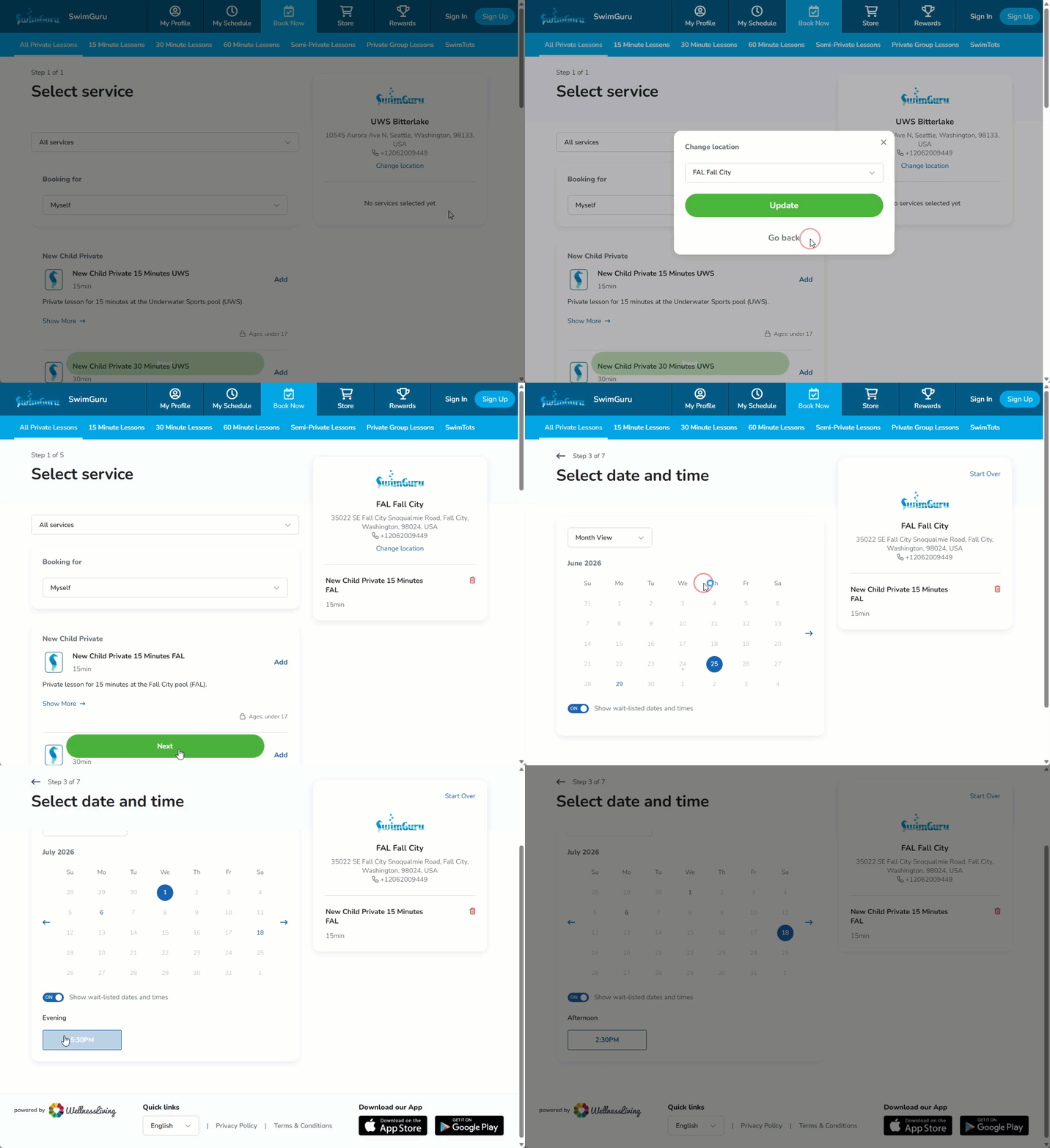
GIF showing how to view available time as a guest. Choose a location and a service and click next. Choose Date & Time to see all currently available lessons times.